
Hyundai Creta: Cooling System / Cooling Fan
Specifications
| Specifications |
|
Item |
Specification |
|
Fan type |
Puller |
|
Fan speed control |
Resistor (HI-LOW-OFF) |
|
Air flow rate [㎥/h (yd³/h)] |
1850 +8% MIN. |
|
Fan speed (rpm) |
2050 ±8% |
|
Current (A) |
13.3 +10% MAX. |
Components and components location
| Components |
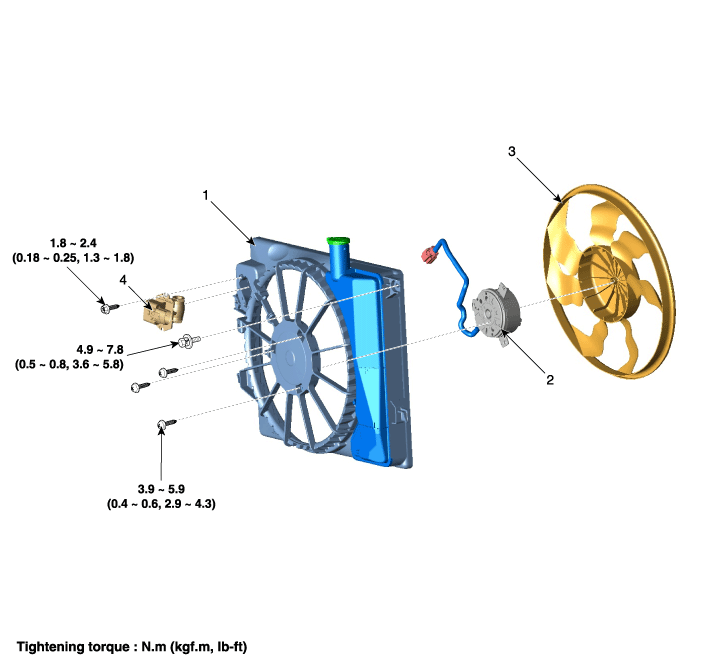
| 1. Cooling fan 2. Fan motor |
3. Cooling fan shroud 4. Cooling fan resistor |
Description and operation
| Description |
[Air conditioning type]
The cooling fan operates in 2 stages (HIGH/LOW). The engine control module (ECM)
controls the cooling fan according to the coolant temperature, vehicle speed
and A/C operation.
[Cooling fan operation conditions]
|
A/C switch |
A/C pressure [kgf/cm² G (psi G)] |
Vehicle speed [km/h (mph)] |
Coolant temperature [°C (°F)] |
Cooling fan speed |
|
OFF |
ã…¡ |
V < 45 (28) |
95 ~ 100 (203 ~ 212) |
LOW |
|
100 (212) or above |
HIGH |
|||
|
45 (28) ≤ V < 80 (49.7) |
95 ~ 100 (203 ~ 212) |
LOW |
||
|
100 (212) or above |
HIGH |
|||
|
80 (49.7) ≤ V |
105 (221) or above |
HIGH |
||
|
ON |
P < 6 (85.3) |
All |
105 (221) or above |
HIGH |
|
6 (85.3) ≤ P < 12 (170.7) |
V < 45 (28) |
45 ~ 100 (113 ~ 212) |
LOW |
|
|
100 (212) or above |
HIGH |
|||
|
45 (28) ≤ V < 80 (49.7) |
95 ~ 100 (203 ~ 212) |
LOW |
||
|
100 (212) or above |
HIGH |
|||
|
80 (49.7) ≤ V |
105 (221) or above |
HIGH |
||
|
12 (170.7) ≤ P < 15.5 (120.5) |
V < 45 (28) |
-30 ~ 95 (-22 ~ 203) |
LOW |
|
|
95 (203) or above |
HIGH |
|||
|
45 (28) ≤ V < 80 (49.7) |
95 ~ 100 (203 ~ 212) |
LOW |
||
|
100 (212) or above |
HIGH |
|||
|
80 (49.7) ≤ V |
105 (221) or above |
HIGH |
||
|
15.5 (120.5) ≤ P |
All |
-30 (-22) or above |
HIGH |
[Non-Air conditioning type]
The cooling fan operates in 1 stages (HIGH). The engine control module (ECM)
controls the cooling fan according to the coolant temperature, vehicle speed
and A/C operation.
[Cooling fan operation conditions]
|
A/C switch |
A/C pressure [kgf/cm² G (psi G)] |
Vehicle speed [km/h (mph)] |
Coolant temperature [°C (°F)] |
Cooling fan speed |
|
OFF |
ã…¡ |
V < 45 (28) |
95 ~ 100 (203 ~ 212) or above |
HIGH |
|
45 (28) ≤ V < 80 (49.7) |
95 ~ 100 (203 ~ 212) or above |
HIGH |
||
|
80 (49.7) ≤ V |
105 (221) or above |
HIGH |
Schematic diagrams
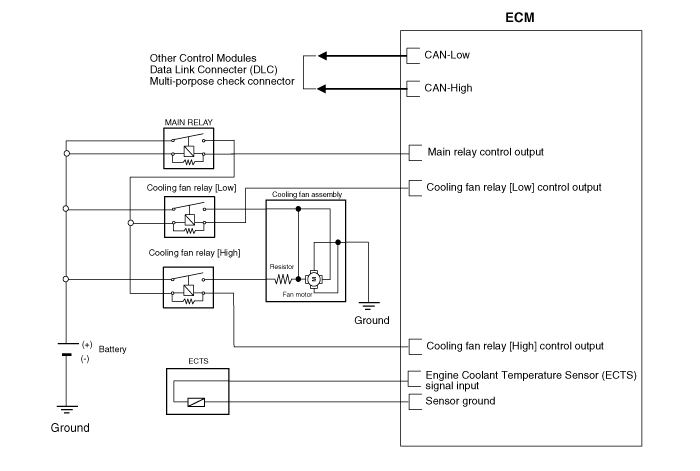
| Circuit Diagram |
Repair procedures
| Removal and Installtion |
Cooling fan assembly
| 1. |
Disconnect the battery negative terminal.
|
| 2. |
Remove the air duct
(Refet to Intake And Exhaust System - " Air Cleaner")
|
| 3. |
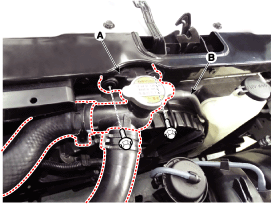
Separate the filler neck (A) from the radiator upper member assembly.
|
| 4. |
Disconnect the radiator reservoir hose (B).
|
| 5. |
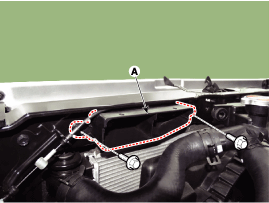
Disconnect the air duct(A).
|
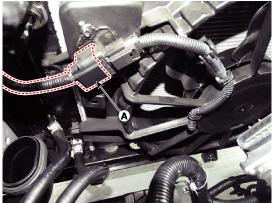
| 6. |
Disconnect the cooling fan connector (A).
|
| 7. |
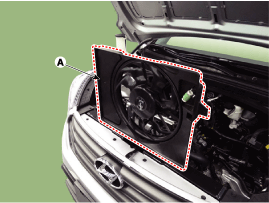
Remove the cooling fan (A) from the vehicle.
|
| 8. |
Install in the reverse order of removal.
|
Resistor
| 1. |
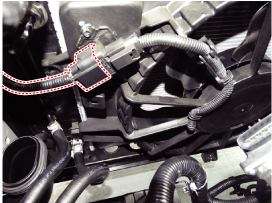
Disconnect the wire harness connector (A) and the fan motor connector
(B).
|
| 2. |
Remove the resistor (A) from the cooling fan shroud.
|
| 3. |
Install in the reverse order of removal.
|
| Disassembly |
| 1. |
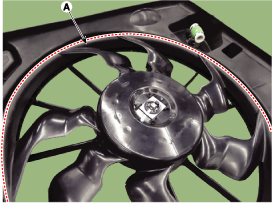
Remove the cooling fan (A) from the cooling fan assembly.
|
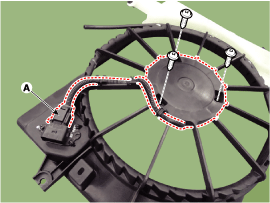
| 2. |
Disconnect the fan motor connector (A) from the resistor.
|
| 3. |
Remove the fan motor (B) from the cooling fan shroud.
|
| 4. |
Install in the reverse order of removal.
|
| Inspection |
| Fan Motor |
| 1. |
Disconnect the fan motor connector from the resistor.
|
| 2. |
Connect the battery voltage to the "+" terminal and ground to "-" terminal.
|
| 3. |
Check the cooling fan motor operates well.
|
 Coolant: Repair procedures
Replacement And Air Bleeding
•
Never remove the radiator cap when the engine is hot. ...
 Radiator
Components and components location
Components
1.
Radiator upper bracket (RH)
2. Radiator upper bracket (LH)
3. Mounting insulator
4. ...
Other information:
Hyundai Creta GS 2014-2019 Service Manual: Catalytic Converter: Description and operation
Description
The catalytic converter of the gasoline engine is a three way catalyst. It oxidizes
carbon monoxide and hydrocarbons (HC), and separates oxygen from the oxides
of nitrogen (NOx).
...
Hyundai Creta GS 2014-2019 Owners Manual: Driving your vehicle
WARNING
Carbon monoxide (CO) gas is toxic. Breathing CO can cause
unconsciousness and death.
Engine exhaust contains carbon monoxide which cannot be seen or smelled.
Do not inhale engine exhaust.
If at any time you smell engine exhaust inside the vehicle, open the
windows immediately. Exposu ...
© 2017-2026 www.hcrmangs.com
