Hyundai Creta: Trunk Trim / Repair procedures
| • |
Put on gloves to protect your hands.
|
|
| • |
When prying with a flat-tip screwdriver or use a prying trim
tool, wrap it with protective tape, and apply protective tape
around the related parts, to prevent damage.
|
| • |
Use a plastic panel removal tool to remove interior trim pieces
to protect from marring the surface.
|
| • |
Take care not to bend or scratch the trim and panels.
|
|
| 1. |
Remove the rear seat cushion assembly.
(Refer to Rear Seat - "Rear Seat Assembly")
|
| 2. |
Remove the rear seat back assembly.
(Refer to Rear Seat - "Rear Seat Assembly")
|
| 3. |
Remove the rear door scuff trim.
(Refer to Interior Trim - "Door Scuff Trim")
|
| 4. |
Remove the luggage covering board (A).
|
| 5. |
Remove the covering shelf trim (B).
|
| 6. |
Remove the rear transverse trim (C).
|
| 7. |
After loosening the mounting screws, then remove the luggage side trim
(D).
|
| 8. |
To install, reverse the removal procedure.
| •
|
Replace any damaged clips.
|
|
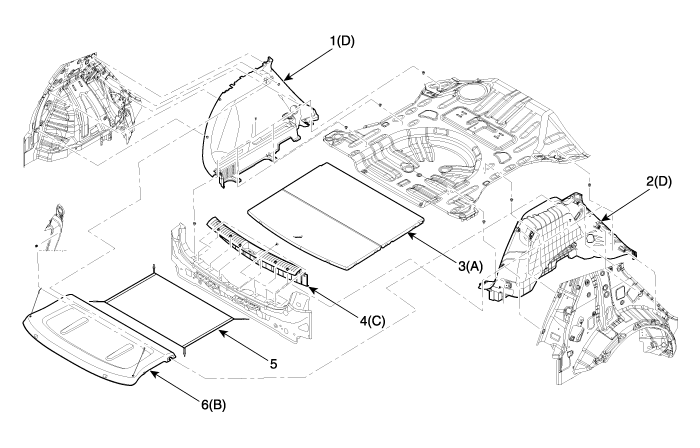
1. Luggage side trim
[LH]
2. Luggage side trim [RH]
3. Luggage covering board
|
4. Rear transverse trim
5. Luggage net assembly
6. Covering shelf trim
|
|



 Trunk Trim
 Windshield Glass