
Hyundai Creta: Air Conditioning System / Photo Sensor
Description and operation
| Description |
The photo sensor is located at the center of the defrost nozzles.
The photo sensor contains a photovoltaic (sensitive to sunlight) diode. The
solar radiation received by its light receiving portion, generates an electromotive
force in proportion to the amount of radiation received which is transferred
to the automatic temperature control module so that the solar radiation compensation
will be performed.
Repair procedures
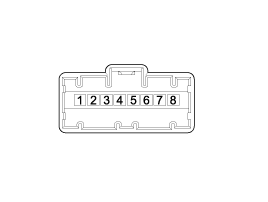
| Inspection |
| 1. |
Turn the ignition switch ON.
|
| 2. |
Connect the GDS.
|
| 3. |
Emit intensive light toward the photo sensor using a lamp, and check
the output voltage change.
|
| 4. |
The voltage will rise with higher intensive light and reduce with lower
intensive light.
|
| Replacement |
| 1. |
Disconnect the negative (-) battery terminal.
|
| 2. |
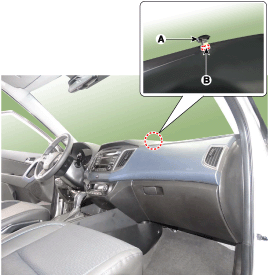
With a flat-head screwdriver, remove the photo sensor (A) from the center
of the defrost nozzle after disconnecting the connector (B).
|
| 3. |
Install in the reverse order of removal.
|
 In-car Sensor
Description and operation
Description
The In-car air temperature sensor is built in the heater & A/C control unit.
The sensor contains a thermistor which measures the temperat ...
 Ambient Temperature Sensor
Description and operation
Description
The ambient temperature sensor is located at the front of the condenser and
detects ambient air temperature. It is a negative type thermistor; ...
Other information:
Hyundai Creta GS 2014-2019 Service Manual: Description and operation
Description
The starting system includes the battery, starter, solenoid switch, ignition
switch, inhibitor switch (A/T), clutch pedal switch (M/T), ignition lock switch,
connection wires and the battery cable.
When the ignition key is turned to the start position, current f ...
Hyundai Creta GS 2014-2019 Service Manual: Rear Transverse Trim
Components and components location
Component Location
1. Rear transverse trim
Repair procedures
Replacement
•
Put on gloves to protec ...
© 2017-2026 www.hcrmangs.com
