
Hyundai Creta: Accessing your vehicle / Smart key precautions
The smart key will not work if any of the following occur:
- The smart key is close to a radio transmitter such as a radio station or an airport which can interfere with normal operation of the transmitter.
- The smart key is near a mobile two way radio system or a cellular phone.
- Another vehicle’s smart key is being operated close to your vehicle.
When the smart key does not work correctly, open and close the door with the mechanical key. If you have a problem with the smart key, it is recommended that you contact an authorized HYUNDAI dealer.
If the smart key is in close proximity to your mobile phone, the signal could be blocked by your mobile phones normal operational signals. This is especially important when the phone is active such as making and receiving calls, text messaging, and/or sending/receiving emails. Avoid placing the smart key and your mobile phone in the same pants or jacket pocket and always try to maintain an adequate distance between the two devices.
NOTICE
Keep the smart key away from electromagnetic materials that blocks electromagnetic waves to the key surface.
Battery replacement
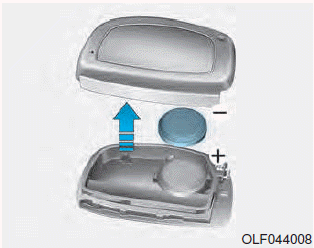
If the Smart Key is not working properly, try replacing the battery with a new one.
Battery Type: CR2032
To replace the battery:
1. Pry open the rear cover of the smart key.
2. Remove the old battery and insert the new battery. Make sure the battery position is correct.
3. Reinstall the rear cover of the smart key.
If you suspect your smart key might have sustained some damage, or you feel your smart key is not working correctly, it is recommended that you contact an authorized HYUNDAI dealer.
 Smart key
Your HYUNDAI uses a Smart Key,
which you can use to lock or unlock
a door (and tailgate) and even start
the engine.
1. Door Lock
2. Door Unlock
3. Tailgate Unlock
Locking
To lock :
1 ...
 Immobilizer system
The immobilizer system protects your
vehicle from theft. If an improperly
coded key (or other device) is used,
the engine’s fuel system is disabled.
When the ignition switch is placed in
th ...
Other information:
Hyundai Creta GS 2014-2019 Service Manual: Power Seat Motor: Repair procedures
Inspection
Power Seat Motor
1.
Disconnect the connectors for each motor.
(Refer to Body - "Front Seat Assembly")
A : Slide motor
B : Rear height motor
C : Front height motor
D : Recline motor
...
Hyundai Creta GS 2014-2019 Owners Manual: TPMS (Tire Pressure
Monitoring System)
malfunction indicator
The TPMS malfunction indicator will
illuminate after it blinks for approximately
one minute when there is a
problem with the Tire Pressure
Monitoring System. If the system is
able to correctly detect an under inflation
warning at the same time as system
failure then it will illuminat ...
