
Hyundai Creta: Mirrors / Inside rearview mirror
Before you start driving, adjust the rearview mirror to the center on the view through the rear window.
WARNING
Make sure your line of sight is not obstructed. Do not place objects in the rear seat, cargo area, or behind the rear headrests which could interfere with your vision through the rear window.
WARNING
To prevent serious injury during an accident or deployment of the air bag, do not modify the rearview mirror and do not install a wide mirror.
WARNING
NEVER adjust the mirror while driving. This may cause loss of vehicle control resulting in an accident.
Day/night rearview mirror
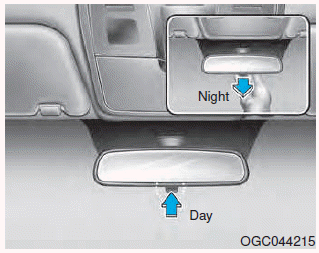
Make this adjustment before you start driving and while the day/night lever is in the day position.
Pull the day/night lever toward you to reduce glare from the headlights of the vehicles behind you during night driving.
Remember that you lose some rearview clarity in the night position.
Electrochromic mirror (ECM)
The electric rearview mirror automatically controls the glare from the headlights of the car behind you in nighttime or low light driving conditions.
When the engine is running, the glare is automatically controlled by the sensor mounted in the rearview mirror. The sensor detects the light level around the vehicle, and automatically adjusts to control the headlight glare from vehicles behind you.
Whenever the shift lever is placed in R (Reverse), the mirror will automatically go to the brightest setting in order to improve the drivers view behind the vehicle.
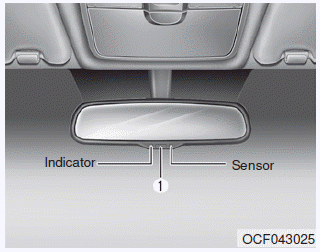
- Press the ON/OFF button (1) to
turn the automatic dimming function
off. The mirror indicator light
will turn off.
Press the ON/OFF button (1) to turn the automatic dimming function on. The mirror indicator light will illuminate. - The mirror defaults to the ON position whenever the ignition switch is turned on.
NOTICE
When cleaning the mirror, use a paper towel or similar material dampened with glass cleaner. Do not spray glass cleaner directly on the mirror as that may cause the liquid cleaner to enter the mirror housing.
 Mirrors
...
 Outside rearview mirror
Your vehicle is equipped with both
left-hand and right-hand outside
rearview mirrors.
WARNING
Rearview mirrors
Both right and left outside rear
view mirror are convex.
Objects seen in ...
Other information:
Hyundai Creta GS 2014-2026 Owners Manual: Closing the fuel filler door
1. To install the fuel tank cap (2), turn
it clockwise until it “clicks� once.
This indicates that the cap is
securely tightened.
2. Close the fuel filler door (1) and
push it lightly and make sure that it
is securely closed.
WARNING
Gasoline is highly flammable and
explosive. Fai ...
Hyundai Creta GS 2014-2026 Service Manual: Components and components location
Component Location
1. Rear glass defogger
relay (Buil-in engine room relay box)
2. Rear glass defogger switch (Dual type)
3. Rear glass defogger
switch (Manual type)
4. Rear glass defogger
...
