
Hyundai Creta: Mirrors / Outside rearview mirror
Your vehicle is equipped with both left-hand and right-hand outside rearview mirrors.
WARNING
Rearview mirrors
- Both right and left outside rear
view mirror are convex.
Objects seen in the mirror are closer than they appear. - Use your interior rearview mirror or turn your head and look to determine the actual distance of following vehicles when changing lanes.
WARNING
Do not adjust or fold the outside rearview mirrors while the vehicle is moving. This could result in loss of control, and an accident which could cause death, serious injury or property damage.
NOTICE
- Do not scrape ice off the mirror face; this may damage the surface of the glass.
- If the mirror is jammed with ice, do not adjust the mirror by force. Use an approved spray de-icer (not radiator antifreeze) spray, or a sponge or soft cloth with very warm water, or move the vehicle to a warm place and allow the ice to melt.
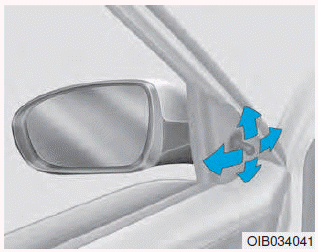
To adjust an outside mirror, move the control lever.
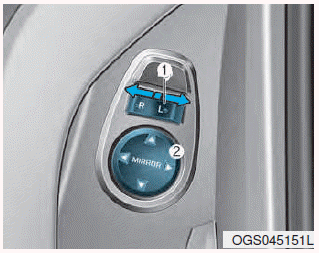
Adjusting the rearview mirrors:
Move the lever (1) to the L (Left) or R (Right) to select the rearview mirror you would like to adjust.
Use the mirror adjustment control (2) to position the selected mirror up, down, left or right.
After adjustment, move the lever (1) to the middle to prevent inadvertent adjustment.
NOTICE
- The mirrors stop moving when they reach the maximum adjusting angles, but the motor continues to operate while the switch is pressed. Do not press the switch longer than necessary, the motor may be damaged.
- Do not attempt to adjust the outside rearview mirror by hand or the motor may be damaged.
Folding the outside rearview mirror
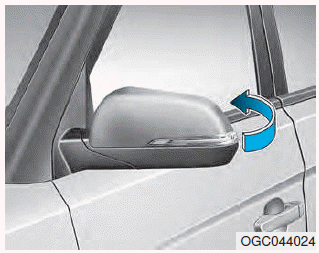
To fold the outside rearview mirror, grasp the housing of the mirror and then fold it toward the rear of the vehicle.
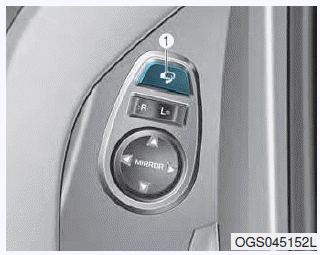
To fold the outside rearview mirror, press the button (1).
To unfold outside rearview mirror, press the button again.
If the button is pressed, the mirror will fold or unfold automatically.
NOTICE
The electric type outside rearview mirror operates even though the ignition switch is in the OFF position. However, to prevent unnecessary battery discharge, do not adjust the mirrors longer than necessary while the engine is not running.
NOTICE
Do not fold the electric type outside rearview mirror by hand. It could cause motor failure.
 Inside rearview mirror
Before you start driving, adjust the
rearview mirror to the center on the
view through the rear window.
WARNING
Make sure your line of sight is not
obstructed. Do not place objects in
the re ...
 Instrument cluster
1. Tachometer
2. Speedometer
3. Fuel gauge
4. Engine coolant temperature gauge
5. Warning and indicator lights
6. Odometer/Trip computer
7. LCD display (including trip computer) ...
Other information:
Lincoln Nautilus 2018-2026 Owners Manual: Checking the Seatbelts. Seatbelt Extensions
Checking the Seatbelts
Check the seatbelts and child restraints
periodically to make sure they work properly
and are not damaged. Make sure there are
no nicks, tears or cuts. Replace if necessary.
Check the following seatbelt assemblies after
a crash.
Retractors.
Buckles.
Front seatbelt buck ...
Lincoln Nautilus 2018-2026 Owners Manual: Headlamps – Troubleshooting
Headlamps – Frequently Asked Questions
Why is there condensation in the headlamps?
Headlamps have vents to accommodate
normal changes in air pressure.
Condensation can be a natural
by-product of this design. When moist
air enters the lamp assembly through
the vents, there is a possibility tha ...
