
Hyundai Creta: Audio / Audio Unit
Components and components location
| Components |
| [Radio/CD/MP3] |
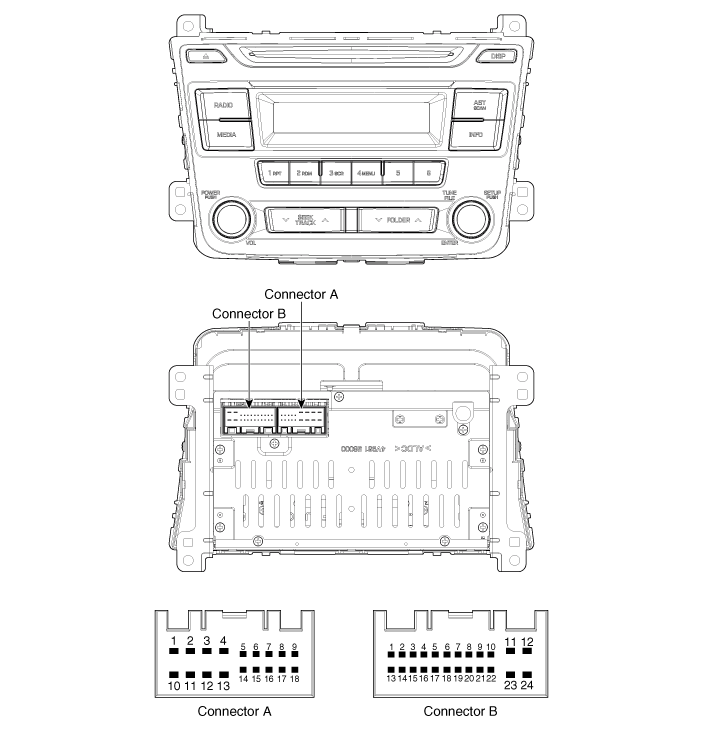
|
No |
Connector A |
Connector B |
|
1 |
Rear left speaker (+) |
- |
|
2 |
Front left speaker (+) |
- |
|
3 |
Front right speaker (+) |
- |
|
4 |
Rear right speaker (+) |
Steering wheel remote |
|
5 |
- |
- |
|
6 |
- |
USB D (+) |
|
7 |
- |
USB VDD |
|
8 |
Illumination (+) |
AUX R IN |
|
9 |
Detent |
AUX GND |
|
10 |
Rear left speaker (-) |
- |
|
11 |
Front left speaker (-) |
ACC |
|
12 |
Front right speaker (-) |
B+ |
|
13 |
Rear right speaker (-) |
- |
|
14 |
- |
- |
|
15 |
- |
- |
|
16 |
- |
- |
|
17 |
Illumination (-) |
Remote GND |
|
18 |
Remote antenna |
USB D (-) |
|
19 |
|
USB GND |
|
20 |
AUX DETECT |
|
|
21 |
AUX L IN |
|
|
22 |
- |
|
|
23 |
- |
|
|
24 |
Power GND |
| [Radio/CD/MP3/Bluetooth] |
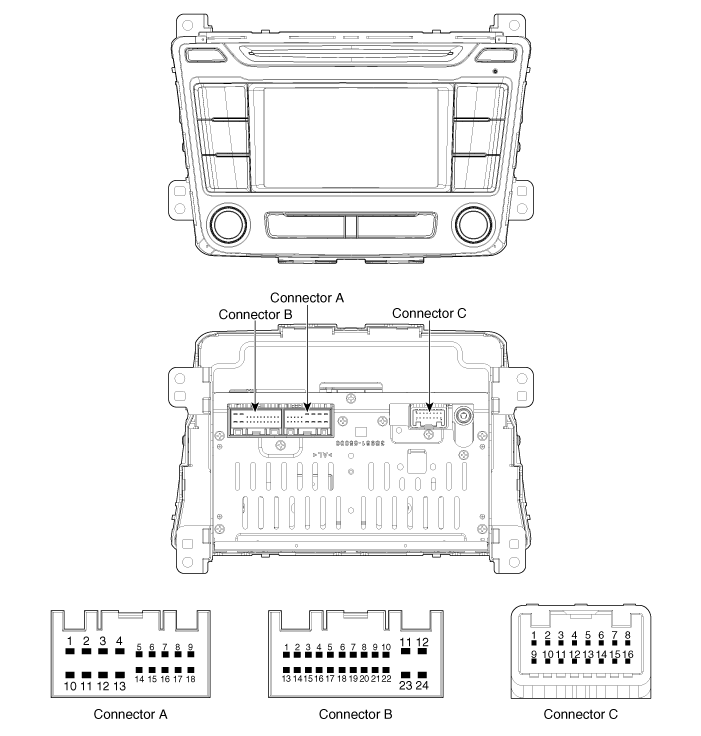
|
No |
Connector A |
Connector B |
Connector C |
|
1 |
Rear left speaker (+) |
- |
- |
|
2 |
Front left speaker (+) |
- |
- |
|
3 |
Front right speaker (+) |
- |
Camera GND |
|
4 |
Rear right speaker (+) |
Steering wheel remote |
Camera video_Input |
|
5 |
- |
- |
- |
|
6 |
- |
USB D (+) |
- |
|
7 |
- |
USB VDD |
- |
|
8 |
Illumination (+) |
AUX right_Input |
- |
|
9 |
- |
AUX GND |
- |
|
10 |
Rear left speaker (-) |
Mic (+) Bluetooth |
Camera B (+) |
|
11 |
Front left speaker (-) |
ACC |
P_GND |
|
12 |
Front right speaker (-) |
B+ |
R_Detect |
|
13 |
Rear right speaker (-) |
- |
- |
|
14 |
- |
- |
- |
|
15 |
- |
- |
- |
|
16 |
- |
Speed |
- |
|
17 |
Illumination (-) |
Remote GND |
|
|
18 |
Remote antenna |
USB D GND |
|
|
19 |
|
USB GND |
|
|
20 |
AUX Detect |
||
|
21 |
AUX left_Input |
||
|
22 |
Mic (-) Bluetooth |
||
|
23 |
- |
||
|
24 |
Power GND |
Repair procedures
| Removal |
| 1. |
Disconnect the negative (-) battery terminal.
|
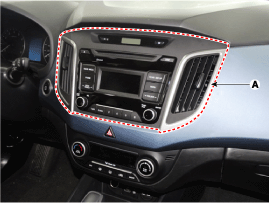
| 2. |
Remove the center fascia panel (A).
(Refer to Body - "Crash Pad")
|
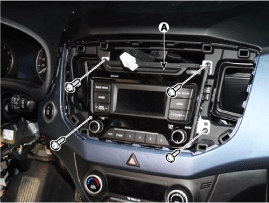
| 3. |
Seperate the audio head unit (A) from crash pad after loosening the
screws (4EA).
|
| 4. |
Remove the audio head unit after disconnecting the connectors and cable
(A).
|
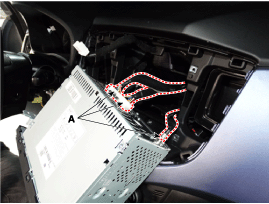

| Installation |
| 1. |
Connect the audio unit connectors and cable.
|
| 2. |
Install the audio head unit.
|
| 3. |
Install the center fescia panel.
|
| 4. |
Connect the negative (-) battery terminal.
|
 Components and components location
Component Location
1. Audio unit
2. Tweeter speaker
3. Roof antenna (Radio)
4. Front door speaker
5. Rear door speaker
6. Antenna feeder cable
7. Ant ...
Other information:
Hyundai Creta GS 2014-2019 Owners Manual: Winter precautions
Use high quality ethylene glycol
coolant
Your vehicle is delivered with high
quality ethylene glycol coolant in the
cooling system. It is the only type of
coolant that should be used because
it helps prevent corrosion in the cooling
system, lubricates the water
pump and prevents freez ...
Hyundai Creta GS 2014-2019 Service Manual: Intake Air Temperature Sensor (IATS)
Description and operation
Description
Intake Air Temperature Sensor (IATS) is included inside Manifold Absolute Pressure
Sensor and detects the intake air temperature.
To calculate precise air quantity, correction of the air temperature is needed
because air density varies ...
