
Lincoln Nautilus: Keys and Remote Controls / Replacing a Lost Key or Remote Control. Programming the Remote Control
Replacing a Lost Key or Remote Control
You can purchase replacement keys or remote controls from an authorized dealer. Authorized dealers can program remote controls for your vehicle.
Programming the Remote Control
Note: You can program a maximum of four remote controls to your vehicle.
Note: If your programmed remote controls are lost or stolen and you do not have an extra coded remote, you need to have your vehicle towed to an authorized dealer. Store an extra programmed remote away from your vehicle in a safe place to help prevent any inconvenience. Contact an authorized dealer to purchase additional spare or replacement remotes.
You must have two previously programmed remote controls inside your vehicle and the new unprogrammed remote controls readily accessible. Contact an authorized dealer to have the spare remote control programmed if two previously programmed remotes are not available. Make sure that your vehicle is off before beginning this procedure. Make sure that you close all the doors before beginning and that they remain closed throughout the procedure. Perform all steps within 30 seconds of starting the sequence. Stop and wait for at least one minute before starting again if you perform any steps out of sequence.
Read and understand the entire procedure before you begin.
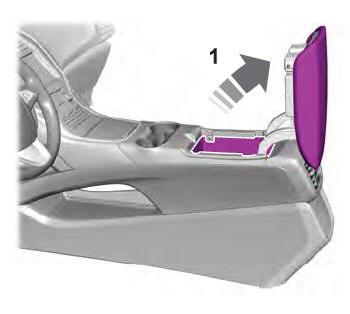
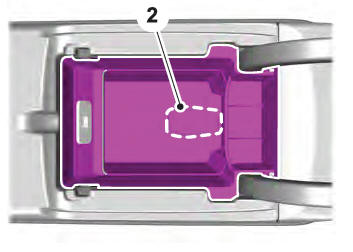
- Place the first programmed remote in the backup slot inside the center console, with your foot off the brake pedal press and release the push button ignition switch.
- Wait five seconds and then press and release the push button ignition switch again.
- Remove the remote cont
- Within 10 seconds, place a second programmed remote control in the backup slot. Press and release the push button ignition switch.
- Wait five seconds and then press and release the push button ignition switch again. Keep the ignition on for at least three seconds, but no more than 10 seconds.
- Remove the remote control.
- Place the unprogrammed remote control in the backup slot and press and release the push button ignition switch.
Programming is now complete. With your foot on the brake pedal, press the push button ignition switch to verify the remote control functions operate and your vehicle starts with the new remote control.
If programming was not successful, wait 10 seconds and repeat Steps 1 through 7. If you are still unsuccessful, take your vehicle to an authorized dealer.
Keys and Remote Controls – Troubleshooting
Keys and Remote Controls – Information Messages

 Changing the Remote Control Battery
WARNING: Keep batteries away from
children to prevent ingestion. Failure to
follow this instruction could result in
personal injury or death. If ingested,
immediately seek medical attention.
WARNI ...
 Phone as a Key
...
Other information:
Lincoln Nautilus 2018-2025 Owners Manual: Power Seats
Head Restraint Components
The head restraints consist of:
An energy absorbing head
restraint.
Two steel stems.
Guide sleeve adjust and unlock
button.
Guide sleeve unlock and remove
button.
Adjusting the Head Restraint
WARNING: Fully adjust the head
restraint before you sit in or operat ...
Hyundai Creta GS 2014-2025 Owners Manual: Air bag warning and indicator
Air bag warning light
The purpose of the air bag warning
light in your instrument panel is to
alert you of a potential problem with
your air bag - Supplemental Restraint
System (SRS).
When the ignition switch is turned
ON, the warning light should illuminate
for approximately 6 secon ...
