
Hyundai Creta: Accessing your vehicle / Remote key precautions
The remote key will not work if any of the following occur:
- The key is in the ignition switch.
- You exceed the operating distance limit (about 30 m [90 feet]).
- The remote key battery is weak.
- Other vehicles or objects may be blocking the signal.
- The weather is extremely cold.
- The remote key is close to a radio transmitter such as a radio station or an airport which can interfere with normal operation of the remote key.
When the remote key does not work correctly, open and close the door with the mechanical key. If you have a problem with the remote key, it is recommended that you contact an authorized HYUNDAI dealer.
If the remote key is in close proximity to your mobile phone, the signal could be blocked by your mobile phones normal operational signals. This is especially important when the phone is active such as making and receiving calls, text messaging, and/or sending/receiving emails. Avoid placing the remote key and your mobile phone in the same pants or jacket pocket and always try to maintain an adequate distance between the two devices.
NOTICE
Keep the remote key away from electromagnetic materials that blocks electromagnetic waves to the key surface.
Battery replacement
If the remote key is not working properly, try replacing the battery with a new one.
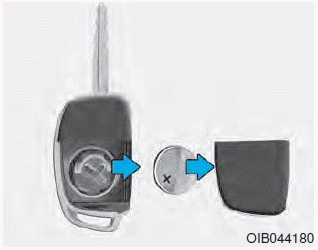
Battery Type: CR2032
To replace the battery:
1. Insert a slim tool into the slot and gently pry open the cover.
2. Remove the old battery and insert the new battery. Make sure the battery position is correct.
3. Reinstall the rear cover of the remote key.
If you suspect your remote key might have sustained some damage, or you feel your remote key is not working correctly, it is recommended that you contact an authorized HYUNDAI dealer.
 Remote key
Your HYUNDAI uses a remote key,
which you can use to lock or unlock
a door (and tailgate) and even start
the engine.
1. Door Lock
2. Door Unlock
3. Tailgate Unlock
Locking
To lock:
1. ...
 Smart key
Your HYUNDAI uses a Smart Key,
which you can use to lock or unlock
a door (and tailgate) and even start
the engine.
1. Door Lock
2. Door Unlock
3. Tailgate Unlock
Locking
To lock :
1 ...
Other information:
Hyundai Creta GS 2014-2019 Service Manual: Clutch Tube
Components and components location
Components
[M6CF1]
1. Clutch
pedal assembly
2. Clutch pedal arm
3. Ignition lock & clutch switch
4. Washer
5. Snap
pin
6. Master cylinder
7. Reservoir hose
8. Clutch tube
...
Hyundai Creta GS 2014-2019 Service Manual: Description and operation
Description
This specification applies to HCU(Hydraulic Control Unit) and ECU(Electronic
Control Unit) of the HECU.(Hydraulic and Electronic Control Unit)
This specification is for the wiring design and installation of ABS/ESP ECU.
This unit has the functions as follows.
...
