
Hyundai Creta: Ignition Switch Assembly / Repair procedures
Hyundai Creta GS 2014-2019 Service Manual / Body Electrical System / Ignition Switch Assembly / Repair procedures
| Removal |
| 1. |
Disconnect the negative (-) battery terminal.
|
| 2. |
Remove the driver crash pad lower panel.
(Refer to Body - "Crash Pad Lower Panel")
|
| 3. |
Remove the steering column upper and lower shroud panel.
(Refer to Body - "Steering Column Shroud Panel")
|
| 4. |
Remove the wiper switch.
(Refer to Multifunction Switch - "Multifunction Switch")
|
| 5. |
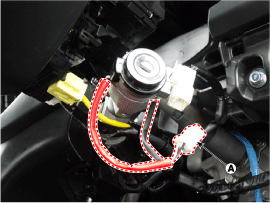
Remove the key warning/immobilizer connector (A).
|
| 6. |
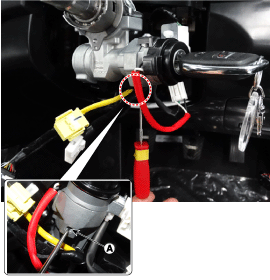
Insert key and turn it to ACC position.
|
| 7. |
Pushing lock pin (A) with the awl.
|
| 8. |
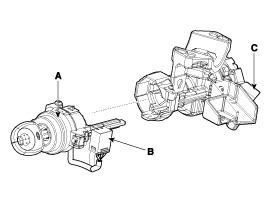
Remove the key lock cylinder (A).
B : Key warning switch
C : Ignition switch connector
|
| Installation |
| 1. |
Install the key lock cylinder.
|
| 2. |
Install the key warning switch.
|
| 3. |
Install the key warning/immobilizer connector.
|
| 4. |
Connect the ignition switch connector after Install the ignition switch.
|
| 5. |
Install the wiper switch.
|
| 6. |
Install the steering column shrouds.
|
| 7. |
Install the driver crash pad lower panel.
|
| Inspection |
| 1. |
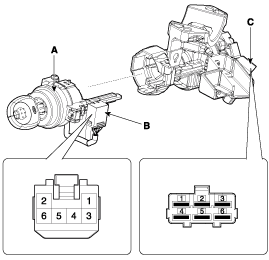
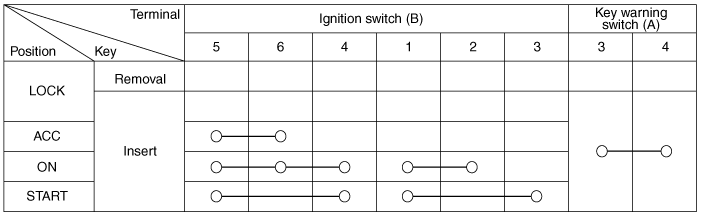
Disconnect the ignition switch connector (B) and key warning switch
connector (A) from the steering column.
|
| 2. |
Check for continuity between the terminals.
|
| 3. |
If continuity is not specified, replace the switch.
|

Other information:
Hyundai Creta GS 2014-2019 Service Manual: Description and operation
Description
System Overview
The System offers the following features:
–
Human machine interface through a 1-stage button, for terminal switching
and engine start.
–
Control of external relays for ACC / IGN1 / IGN2 termin ...
Hyundai Creta GS 2014-2019 Service Manual: Description and operation
Function of Safety Power
Window
When driver door power window auto-up switch is operated, safety function is
activated.
1.
Safety function condition
When detect the force of 100N (using the 10N/mm spring) during the window
rising, window is rev ...
© 2017-2026 www.hcrmangs.com
